Canteen Management Software in Bangladesh: Guide
A public canteen and an employee-subsidized canteen need different software, even when both serve lunch quickly.
Last verified: 2026-08-28
Canteen management software controls fast meal sales, menu availability, kitchen preparation, token pickup, stock and reporting. In office, factory, hospital or campus canteens, it may also need to identify eligible diners and apply meal allowances or subsidies.
Start by defining the canteen model. A public cash counter can use restaurant POS workflows. A closed employee canteen often needs identity, allowance and employer-settlement functions.
Map who pays for the meal
The diner may pay full price, use an employer subsidy, consume a prepaid allowance or create a monthly deduction. The software must keep these payment sources separate.
Rosuii supports restaurant payments and customer records, but it does not provide employee meal wallets, payroll deductions, subsidy rules or company invoicing by diner.
Move the lunch queue
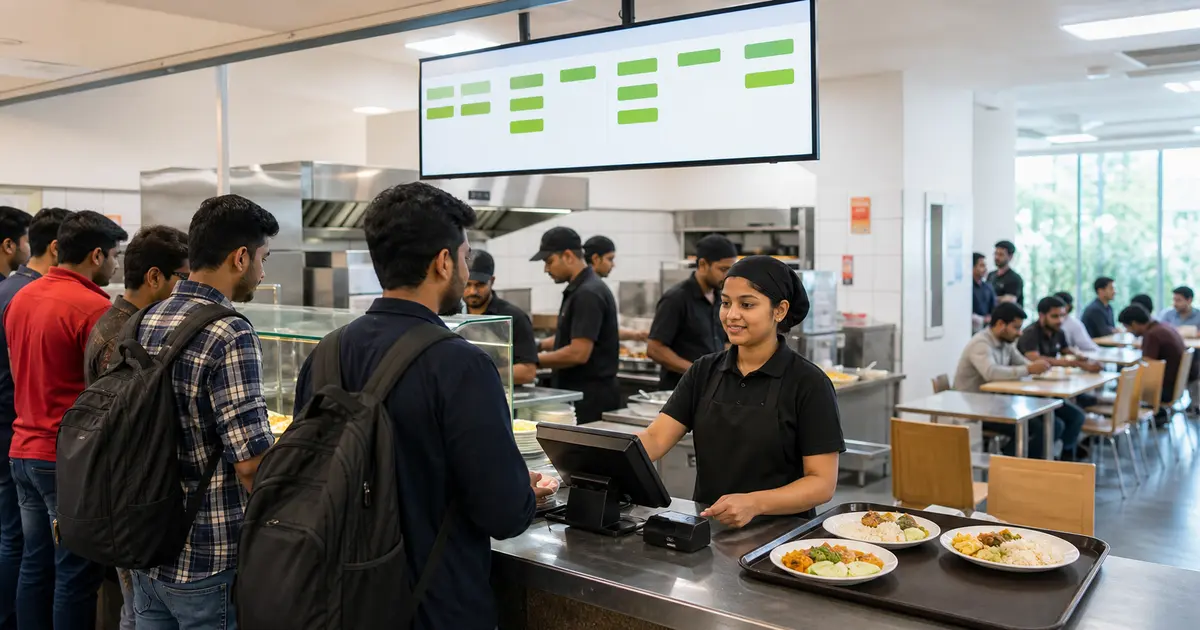
Use a short menu, clear combos and large POS buttons. KOT or KDS should reach the right preparation station, and a token board should let diners wait away from the counter.
Rosuii supports POS, variations, combos, KDS and CDS. KDS: Starter and above; CDS: Starter and above. Live screen updates need internet. A self-service kiosk mode is not currently documented.
Plan menu and production
A canteen often serves a predictable number of meals in a short window. Use previous weekday sales, attendance expectations and approved meal plans to decide production.
Rosuii records item sales, stock, purchase orders, productions and wastage. It does not forecast canteen meals automatically from employee attendance.
Identify diners when required
Some canteens need staff ID cards, biometric devices, student accounts or department codes. Test duplicate use, guest meals and lost-card handling.
Rosuii identifies customers mainly by phone and does not include biometric attendance-linked meal authorization, RFID card balances or student account billing.
Where Rosuii fits
Rosuii can fit a public or cash-based canteen needing fast POS, kitchen flow, token display, stock, purchases, expenses, staff and reports. English and Bangla and BDT pricing suit local operations.
For subsidized enterprise canteens, Rosuii would need another system for eligibility, allowance and employer settlement. Do not buy on the assumption that a loyalty point balance is the same as a controlled meal allowance.
Canteen demo checklist
Simulate the busiest 15 minutes and the end-of-month settlement.
- Sell a meal combo in a few taps
- Route two items to different stations
- Display a ready token
- Block an ineligible or duplicate meal
- Apply subsidy and employee contribution
- Reconcile cash and sponsored meals
- Compare production, sales and wastage
Choose the canteen operating model first
Software requirements depend on who selects, receives and pays for meals. A cash counter, employee subsidy, prepaid student balance, monthly company invoice and contracted meal entitlement are different workflows. Document identity, eligibility, price responsibility, approval and settlement for each meal type before requesting a demo.
Do not use a person's balance or employee record as proof that a meal was actually served. Preserve order, entitlement, payment and handover events separately so disputes can be reviewed.
Canteen control matrix
Keep the rule effective date and organization or branch scope visible. A subsidy or entitlement change should not rewrite prior meal records.
| Area | Control question | Evidence |
|---|---|---|
| Identity | Who may receive the meal? | Active account/card/approved roster |
| Entitlement | What quantity and period apply? | Rule and usage event |
| Price | Who pays which portion? | Meal price and subsidy rule |
| Production | How many meals should be prepared? | Approved demand and batch plan |
| Handover | Was the correct meal issued? | Token/order status |
| Settlement | What is billed to whom? | Orders, adjustments and approval |
| Privacy | Who can see diner history? | Role and access log |
Plan production without hiding waste
Combine confirmed pre-orders or entitlements with a documented walk-in planning method, then record planned, produced, issued, returned and wasted quantities. A forecast should support preparation; it should not convert unserved meals into sales or consumption.
Use item and batch records appropriate to the food-safety process. Software can timestamp and retrieve a record but does not verify temperature, hygiene or suitability unless staff use a tested procedure and appropriate instruments.
Queue and service test
Time a realistic peak queue on the intended device and network, but do not claim a universal transaction speed. Check what happens when identification fails, an item sells out or the same token is presented twice.
- Identify an eligible diner without exposing excess data
- Select the correct meal and entitlement
- Handle a used or insufficient entitlement clearly
- Process cashless, cash or account billing as configured
- Issue a kitchen token or handover state once
- Work through a connectivity interruption safely
- Correct an identity or order mistake with approval
- Reconcile meals served, payments and billed accounts
Canteen software evaluation checklist
Test organization, site, meal period, diner group, subsidy, entitlement, pre-order, kitchen, handover, adjustment and invoice workflows with representative data. Verify user roles and exports. Ask where personal data is stored, how access is removed and which events are auditable.
Record native, configured, manual and unavailable functions. Verify integration claims with a working test for the intended identity, payroll or payment system; a logo on a vendor slide is not evidence of a supported production connection.
Monthly sponsor or organization reconciliation
For account-billed meals, agree the billable event and period before service begins. Reconcile eligible diners, accepted meal orders, actual handover, price or subsidy rule, authorized adjustments and invoice lines. Keep personal meal details limited to what the agreement and legitimate operational need require.
Send an exception report for duplicate identity, unused entitlement, reversed handover, missing sponsor mapping and disputed amount. Resolve each through an appended adjustment and approval rather than changing the original service record. Lock the accepted period and carry later corrections into a visible subsequent adjustment process. Agree which summary the sponsor receives and restrict unnecessary diner-level detail. Retain approval, invoice and adjustment evidence under the reviewed policy. Verify that the next opening balance matches the accepted prior close before new service records accumulate.
Choose canteen management software by starting with the payer and diner-identification model. Fast POS alone is enough for some canteens and incomplete for others.
Use Rosuii for a public canteen test, but choose a dedicated system if employee allowance, biometric identity or sponsor billing is central.
Related guides
- QSR Software in Bangladesh
- Kitchen Display System Guide
- Table Self Ordering
- Compare restaurant management software
See this workflow in Rosuii: See Rosuii fast-service features
Last updated:
Frequently asked questions
What is canteen management software?
Can Rosuii run a cash-based canteen?
Does Rosuii support employee meal subsidies?
Can Rosuii use biometric identity for meals?
Does Rosuii have a token display?
What does canteen management software manage?
Can canteen software prove food-safety compliance?
What should be tested during a canteen demo?
Run your restaurant on Rosuii
POS, menu, inventory, payroll and more — built for Bangladeshi restaurants.
Start free