
Restaurant Waiter Ordering App: Bangladesh Buyer's Guide
A waiter app should remove duplicate entry without moving cashier permissions onto every phone.
Last verified: 2026-08-28
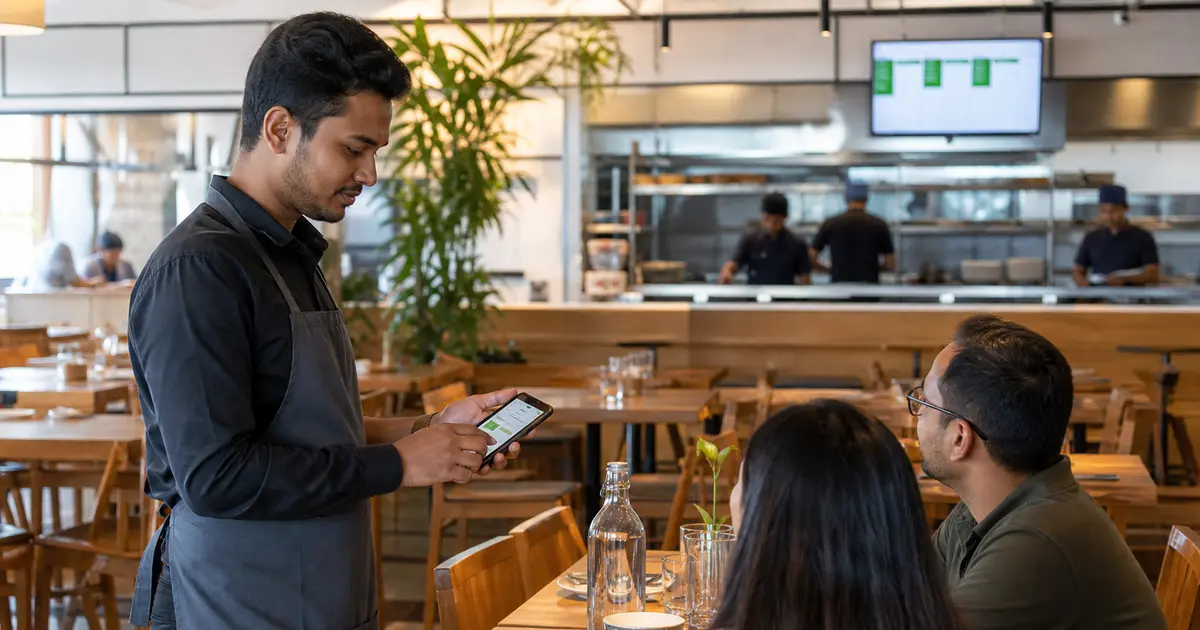
A restaurant waiter ordering app lets floor staff send a table order from a phone or tablet instead of writing it down and entering it again at the cashier. The benefit is not the device itself. It is one accurate order record shared by waiter, cashier and kitchen.
The wrong app creates a new problem: tiny buttons, broad permissions, battery issues and weak Wi-Fi. Test it during a real service pattern before rolling it out.
Follow the order from table to kitchen
The waiter should select branch, floor and table, choose items and modifiers, add a line note and send the order to the correct kitchen station. The cashier should see the same order without retyping it.
Rosuii supports table and waiter assignment, variations, add-ons, combos, notes, KOT and KDS. It runs as a browser PWA, so supported phones and tablets do not need a proprietary handheld.
Keep permissions narrow
Waiters need order-taking access, not plan settings, payroll or unrestricted discounts. Create a waiter role and test what happens when the user attempts to edit price, void an item or view a report.
Rosuii includes role-based permissions. Restaurant owners should still review each granted permission before handing a shared device to staff.
Design for fast table service
Search, category navigation, item photos and modifier order affect speed. A waiter should be able to repeat the previous item, add a clear special request and confirm the table before sending.
Do not rely on memory for unavailable items. Update the menu and tell staff how to handle an item that becomes unavailable after the guest orders.
Plan devices and connectivity
Use a protective case, reliable charging point, screen lock and a staff-device policy. Test Wi-Fi in corners, outdoor seating and between floors.
Rosuii can queue cash orders offline after the device's data has been synced. Live multi-device coordination, KDS updates and online payments require a connection, so a waiter device should not be the only outage plan.
Measure the result
Compare order-entry time, returned items, missing modifiers and time from guest decision to kitchen submission. Faster entry is valuable only if corrections do not rise.
Rosuii waiter or staff reports and order records help managers review activity. Avoid turning the report into surveillance; use it to find training or menu design problems.
Waiter app trial checklist
Give the app to a waiter who did not configure it and watch without guiding every tap.
- Open the correct table
- Add size, add-on and note
- Send to KOT or KDS
- Add another item later
- Try an unauthorized discount
- Move through a weak Wi-Fi area
- Find and print the final bill
Server-side table and order ownership
A waiter app must verify tenant, branch, active employee, role, table or service area and order state on every protected request. A table number entered by the device is not authorization. Define when a waiter may open, edit, transfer, hold, send or request settlement of an order.
Table transfer, server transfer and merged orders need attributable approval where the restaurant requires it. Preserve the original ownership and reason instead of rewriting history.
Order event matrix
Do not equate a successful phone tap with kitchen receipt. Show queued, sent, acknowledged or failed according to actual system events, and provide a safe retry that cannot print twice.
| Action | Validation | Downstream proof |
|---|---|---|
| Open table | Available/current state | Table/order ID |
| Add item | Current menu and price | Line and waiter |
| Modifier | Required/min/max rules | Readable KOT |
| Send | Idempotent transition | Kitchen receipt |
| Change sent item | State and permission | Old/new line |
| Transfer | Authorized destination | Ownership event |
| Settle request | Complete bill state | Cashier handoff |
Device and connectivity controls
Assign devices or sessions to individual users, protect unlock and recovery, remove access during offboarding and avoid storing customer or payment data beyond operational need. A personally owned device policy should define support, privacy and remote session revocation.
For weak connectivity, show pending changes, preserve occurrence time and synchronize idempotently. Test two waiters editing the same table, stale menu data, reconnection and a device that is lost during an open shift.
Waiter-app acceptance script
Compare waiter screen, kitchen output, customer bill, sales report and audit history. Test on the actual small device during realistic lighting and network conditions, not only on a desktop demo.
- Seat and open a table
- Add variant and required modifier
- Send once during slow network
- Correct an already sent item
- Transfer table and server
- Split or move lines where supported
- Escalate allergy note under approved process
- Request bill and inspect cashier state
- Deactivate the waiter session
Measure service improvement responsibly
Define event times and denominators before comparing order-entry or correction rates. Separate seating-to-first-order, waiter entry, kitchen acknowledgment and table settlement; a total duration does not identify the cause. Review item corrections and missing modifiers with order evidence.
Do not publish speed or error-reduction claims without tenant approval, a comparable baseline and documented method. Use observations to improve menu design, training, device coverage or workflow, then rerun the same measurement.
Create a shift-start readiness check for charged devices, current menu version, logged-in named users, station routing, network status and fallback materials. At close, review pending orders, unsent changes, shared sessions and devices not returned. A support case should contain table or order ID, event time and observed state without unnecessary customer data. If an app release changes menu, authentication, sync or kitchen behaviour, repeat the relevant acceptance tests before every branch receives it. Keep the previous safe release and rollback owner documented.
Choose a restaurant waiter ordering app that makes the order clearer, not one that simply moves the cashier screen to a smaller device.
Create a waiter role in Rosuii and test ten real menu orders before buying devices for the whole team.
Related guides
- Tablet POS for Restaurant
- Restaurant Staff Roles and Permissions
- Restaurant Table Management System
- Compare restaurant management software
See this workflow in Rosuii: See Rosuii waiter and table workflows
Last updated:
Frequently asked questions
What is a restaurant waiter ordering app?
Does Rosuii need special waiter hardware?
Can a waiter send notes and modifiers?
Can I restrict waiter permissions?
Does the waiter app work offline?
What does a restaurant waiter ordering app do?
Can waiters use personal phones?
How are duplicate kitchen tickets prevented?
What should happen when a waiter device is lost?
Run your restaurant on Rosuii
POS, menu, inventory, payroll and more — built for Bangladeshi restaurants.
Start free

