POS Printer Specifications: 12 Things to Check Before Buying
A listing can look fast and still be wrong for your restaurant. Translate every specification into a workflow check.
Last verified: 2026-08-28
POS printer specifications are useful only when translated into a real job. A 250mm/s claim will not fix a missing Ethernet port; 203dpi will not guarantee Bangla output; an auto cutter will not help if local service excludes it.
Use this checklist beside the product label, official manual and a live print test. Never merge specifications from different suffixes.
The specification checklist
| Specification | What it means | Restaurant question |
|---|---|---|
| Paper width | 58mm or 80mm roll | Will long items and modifiers fit? |
| Effective width | Printable area is narrower than roll | How many characters fit? |
| Speed | Maximum millimetres per second | How fast is the real logo-heavy bill? |
| Resolution | Usually 203dpi | Is small text and QR clear? |
| Auto cutter | Cuts each receipt | What is its rated life and warranty? |
| Head life | Published thermal-head distance | Under what test conditions? |
| Roll diameter | How much paper fits | How often will staff reload? |
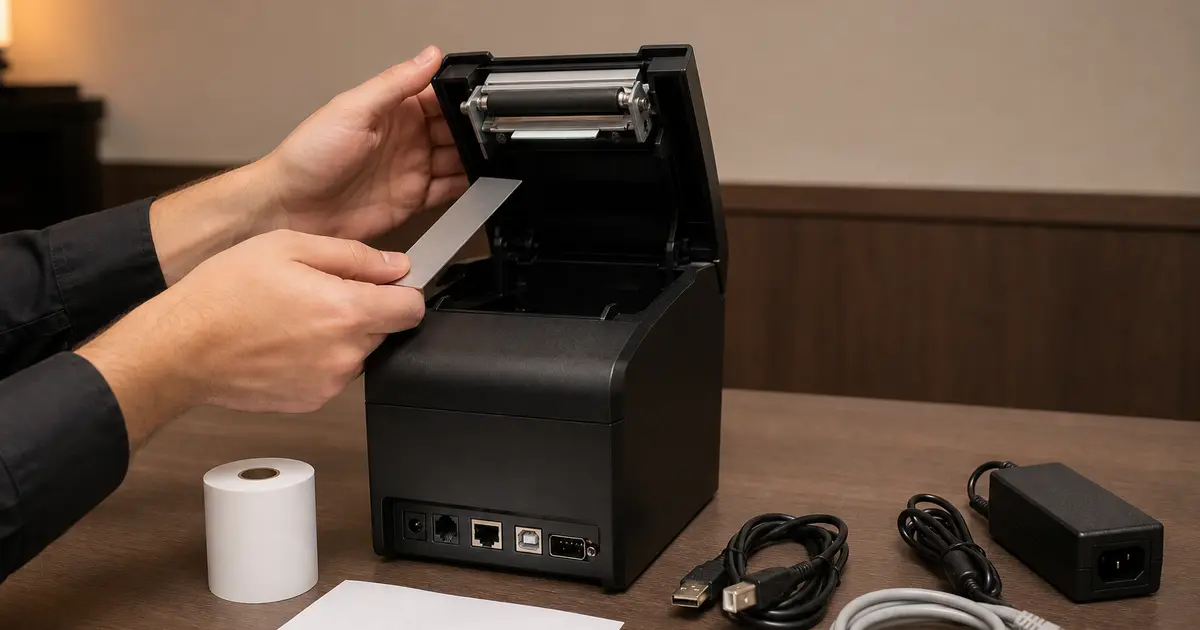
| Interfaces | USB, serial, LAN, BT or Wi-Fi | Which exact ports are included? |
| Protocol | Often ESC/POS or OPOS | Does the software/driver support it? |
| Drivers/SDK | Operating-system tools | Does your actual device work? |
| Cash-drawer port | RJ11-style control port | Is voltage/pinout compatible? |
| Warranty | Local repair promise | Which parts and service centre? |
Speed: read the word maximum
A manufacturer speed is usually a maximum for a particular density and test pattern. Logos, QR codes, dark printing, network transport and cutter movement reduce end-to-end speed.
Anything around 200–250mm/s is already sufficient for many fixed restaurant counters. The difference between zero and one failed ticket is more important than the difference between 250 and 300 on a seller page.
Resolution and Bangla text
Most common thermal receipt printers are 203dpi, which is adequate for text and normal QR codes. Bangla depends on font rendering, driver support or printing the text as an image; it is not guaranteed by dpi.
Test the smallest useful Bangla type, conjunct letters, English numerals and a real QR. Do not make critical totals too small merely to save paper.
Head, cutter, MCBF and MTBF
Head life is often expressed in kilometres of paper; cutter life in operations. MCBF describes an average interval between failures and MTBF an average time between failures under defined conditions. These are engineering ratings, not the duration of a local warranty.
Compare figures from official manuals only and maintain the paper path. Dust, adhesive, unsuitable media, grease and power problems can shorten field life.
Paper roll dimensions
Width alone is incomplete. Check maximum outer diameter, core diameter and allowed thickness. A portable printer may take an 80mm-wide roll but hold much less paper than a counter unit.
Keep the roll within the manual's limits and load it straight. Incorrect paper can cause rubbing, skew, faded areas and cutter trouble.
Interface and protocol
The same model family can have different ports. Photograph the rear panel and record the suffix. ESC/POS compatibility is common, but command and character support still varies.
A driver available online is not proof of compatibility. Install it on the production operating system and print from the actual Rosuii/browser workflow before rollout.
Write a one-page acceptance test
- Correct full model and serial
- Included adapter and cables
- Self-test page
- Bangla/English receipt
- QR scan
- 20 rapid cuts
- Network or pairing recovery
- Cash drawer if used
- Written warranty and service address
Turn specifications into tests
A datasheet value is useful only when the exact model and interface SKU match the quotation.
| Specification | Why | Test |
|---|---|---|
| Paper/print width | Layout capacity | Longest receipt/KOT |
| Interface | Device/network fit | Connect and reconnect |
| Command/driver | Software compatibility | Actual POS output |
| Speed | Queue context | Representative batch |
| Cutter | Handover workflow | Repeated cut/recovery |
| Resolution | Text/logo/barcode | Real samples |
| Language | Bangla/English | Exact characters |
| Duty/reliability | Station load | Peak-like run |
| Warranty | Failure recovery | Written exact terms |
Compatibility proof
Record operating system, browser/app print method, driver version, command language, cable or network configuration and POS version. Print Bangla, English, QR or barcode and drawer command where required.
Ask the software vendor for tested models, but still run the intended hardware. Compatible in principle does not prove every driver and connection works.
Environmental and service fit
Follow manufacturer operating and cleaning guidance. Do not place a thermal printer where heat invalidates the paper or device limits.
- Counter or kitchen temperature/grease
- Power quality and approved adapter
- Cable route and strain
- Network ownership
- Paper availability and quality
- Cleaning method
- Cutter/head service
- Local warranty route
- Spare or fallback station
Procurement acceptance
Match delivered model, interfaces and serial with the approved quote. Inspect damage and accessories, then run the full test pack and interruption recovery before unconditional acceptance. Store invoice, warranty, drivers and configuration.
For multiple branches, pilot the exact SKU and standardize only after support and consumable evidence. Re-verify later purchases because revisions and bundles can change.
Create a weighted decision sheet only after marking critical pass/fail requirements. A printer that cannot produce the required language or reconnect safely should not win because of a high advertised speed. Keep raw test outputs and exact environment beside the score.
Review operational ownership cost after a pilot: paper, reprints, jams, cutter issues, support cases, downtime and staff workarounds. Use it to approve, reject or limit deployment. Do not publish a reliability percentage from a small internal test as a market claim.
Buy from the acceptance test, not the feature list. Paper width, exact interface, verified driver and local service usually decide restaurant success more than the highest headline number.
Related guides
- Best POS Printer Shortlist
- Printer Interface Guide
- Thermal Paper Guide
- Compare restaurant management software
See this workflow in Rosuii: Match printer specs to Rosuii receipts
Sources checked
Last updated:
Frequently asked questions
What specifications matter most in a POS printer?
Is 203dpi enough for receipts?
Is 250mm/s fast enough?
What is ESC/POS?
Does cutter life equal warranty?
Which POS printer specification matters most?
Does faster print speed always matter?
How can Bangla printing be verified?
What is ESC/POS compatibility?
How should POS printer speed be tested?
Which warranty details matter?
Run your restaurant on Rosuii
POS, menu, inventory, payroll and more — built for Bangladeshi restaurants.
Start free