Branded Online Ordering Storefront: Conversion Checklist
The storefront elements that turn a direct ordering link into a credible sales channel.
Last verified: 2026-08-28
A direct ordering page saves commission only when guests trust and use it. Branding, speed and clear ordering information work together to remove hesitation.
Make the first screen useful
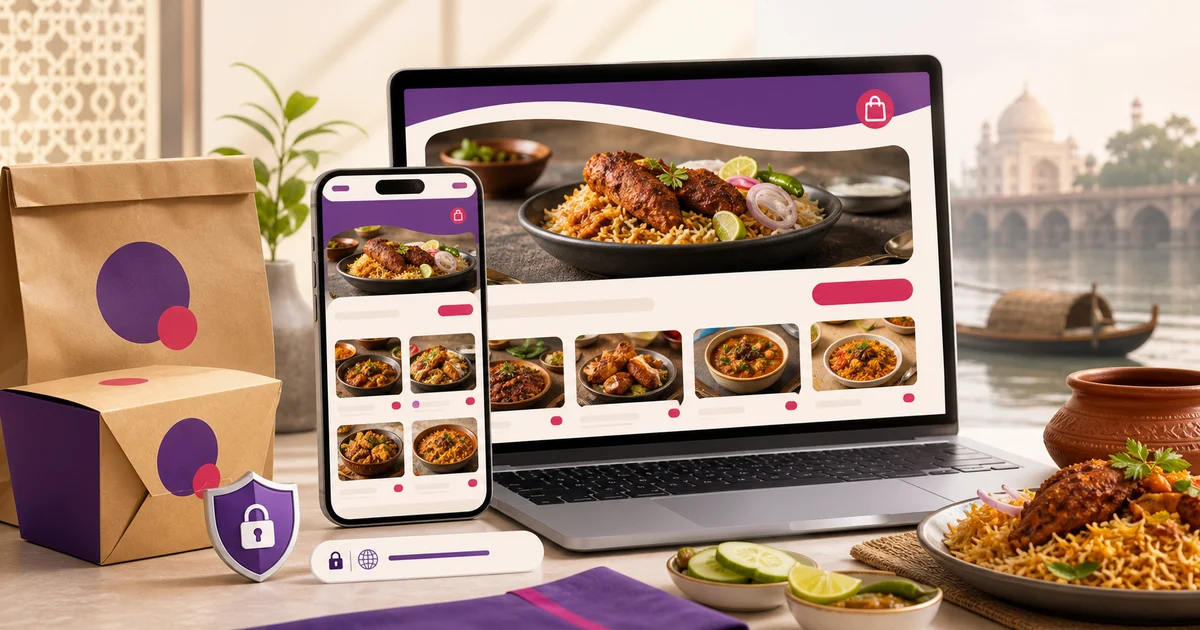
Show the restaurant name, strong food image, delivery or pickup promise and one obvious menu action. Avoid a long introduction before guests can browse.
Build trust before checkout
Keep opening hours, service area, phone, payment options and order tracking visible. Use real menu photos and current prices.
- Mobile-first layout
- Bangla and English content
- Clear cart and checkout
Keep brand and operations aligned
The storefront should share the live menu and availability with POS. A beautiful page loses trust when a sold-out item can still be ordered.
A branded storefront must be operationally trustworthy
An online ordering storefront is the restaurant's digital counter. Brand identity helps recognition, but customers primarily need the correct branch, menu, price, availability, fulfilment choice, payment status and support route. A beautiful storefront that accepts an impossible order or hides material terms weakens the brand.
Define the source of truth for each field before design: restaurant identity and contact, branch hours and service area, menu and modifiers, tax or service treatment, delivery or pickup settings, payment method and order state. The storefront should present those records consistently rather than maintaining a separate decorative copy.
Storefront information architecture
Keep the path short without removing decision-critical information. Category, search and cart controls should remain understandable on a small phone. If checkout needs an account, location permission or another unusual step, explain it before the customer invests time.
| Page or state | Primary customer question | Required evidence |
|---|---|---|
| Landing | Is this the intended restaurant and branch? | Name, identity, address and status |
| Menu | What can I order now? | Current categories, availability and price |
| Item | What is included and what can I change? | Description, variants and modifiers |
| Cart | What did I choose and what is the total? | Line items, fees and edit controls |
| Checkout | What information and payment are required? | Fulfilment, contact, address and terms |
| Confirmation | Was the order accepted and what happens next? | Order ID, state and support route |
| Failure | What failed and can I retry safely? | Clear status without duplicate charge/order |
Apply the restaurant identity without reducing usability
Use the approved compact logo, colour tokens, bilingual type and photography rules. Maintain sufficient contrast, visible focus and readable prices. Do not turn navigation, error messages or buttons into decorative images. The brand can shape tone and visual rhythm while standard interface signals continue to look actionable.
Place branch identity and service state near the top. Multi-branch restaurants should not rely on a small footer address after a customer has built a cart. When the customer changes branch, revalidate menu, availability, fulfilment and cart rather than silently submitting to the wrong location.
Menu data and merchandising controls
Use stable menu records for names, language fields, price, tax treatment, modifier rules and availability. Merchandising can reorder categories, feature items and add useful photographs, but it must not override the operational item. A sold-out state should prevent checkout and explain the available next step.
Descriptions should answer practical questions—portion, core ingredients, format and included sides—without unsupported superlatives or dietary claims. Show a selected option's price impact before it enters the cart. Test minimum and maximum modifier rules, free-choice counts and incompatible combinations.
Transparent cart and checkout
Do not add an unavoidable amount only after the final click. If a charge depends on distance, branch, order value or payment method, show the rule and calculated result as soon as the necessary inputs exist. Avoid fake countdowns, preselected paid add-ons or misleading button labels.
- Show quantity, variant, modifiers and line price
- Label subtotal, discounts, fees and payable total
- Explain fulfilment method and applicable area
- Validate address and required contact fields clearly
- Show accepted payment methods before final action
- Link visible terms and support information
- Prevent double submission while payment is pending
- Preserve or explain cart changes after a validation error
Payment and order-state reliability
Payment success and order acceptance are related but distinct events. The storefront needs an idempotent order and payment workflow so a retry, back button or delayed callback does not create duplicate orders or charges. Show pending when the system does not yet have an authoritative result; do not convert uncertainty into a success message.
Give the customer an order identifier and a support route that can locate it. Record provider references securely on the server and never expose secrets in the browser. Test success, decline, timeout, abandoned redirect, delayed confirmation and repeated callback behaviour for every enabled method.
Bilingual storefront quality
English and Bangla storefronts should use the same item, price, stock, branch and order records. Localize the customer-facing text around those records, then review food names, modifiers, error messages, payment instructions and remedies. Do not let one language keep an old price or unavailable item because it was implemented as a separate menu.
Test language switching before and after items enter the cart. The cart should preserve the same selections and amount or explain why it cannot. Numerals, currency, address input and status wording must remain unambiguous. Machine-drafted text should carry a review state until a qualified reviewer and operations owner approve it.
Discovery, canonical URLs and sharing
Give the storefront one canonical, HTTPS URL and redirect alternate host forms. Use unique page titles and descriptive headings for useful indexable location or menu content where the implementation can keep it current. Do not create thousands of thin parameter URLs from filters or cart state.
Shared links should produce an accurate title, description and representative image without exposing a cart, token or customer detail. Update map profiles, social bios and campaign links to the canonical storefront, and use source labels for measurement without allowing tracking parameters to become duplicate indexed pages.
Performance and accessibility checks
A fast first screen is not enough if item selection or checkout stalls. Measure category navigation, item modal, cart and payment transitions. Load nonessential analytics and campaign scripts carefully and confirm they do not block orders when unavailable.
- Optimize menu images and reserve their layout space
- Keep primary menu content usable without heavy animation
- Use semantic headings, controls and form labels
- Support keyboard focus and visible error association
- Meet readable colour contrast across brand states
- Do not rely on colour alone for availability or errors
- Test lower-cost phones and constrained mobile data
- Measure real ordering pages, not only an empty landing screen
Pre-launch ordering test matrix
Run the matrix on the live-like domain and configuration using controlled test orders. Verify what the kitchen or order dashboard receives, not only the customer screen. Remove test records according to the system process and document blockers before public promotion.
| Scenario | Expected result | Record |
|---|---|---|
| Open/closed branch | Only allowed fulfilment proceeds | Branch schedule and override |
| Available/sold-out item | State is accurate through checkout | Item availability event |
| Complex modifiers | Rules and price remain correct | Cart and order lines |
| Pickup/delivery | Correct fields, fee and branch | Fulfilment selection |
| Payment outcomes | No duplicate and clear state | Order/payment references |
| EN/BN | Same facts and equivalent action | Localized-field review |
| Support | Team can locate and resolve order | Order ID and audit trail |
Measure improvements without fabricated claims
Define funnel events such as menu viewed, item configured, cart reviewed, checkout validated, payment result and order accepted. State the denominator, time period, channel and exclusions before comparing completion. A change in campaign traffic or menu availability can change conversion without the interface being the cause.
Use error rates, support topics and task testing alongside the funnel. Do not publish revenue, speed or conversion claims unless the restaurant has approved data, a documented method and a comparable baseline. Internal observations are useful for prioritization but are not automatically public evidence.
Treat the storefront as part of restaurant operations, not a poster. Update it with the same discipline as the physical menu.
Related guides
- Restaurant Branding System
- Restaurant Custom Domain Guide
- Commission-free Online Ordering
- Compare restaurant management software
See this workflow in Rosuii: Build your branded storefront
Updated:
Frequently asked questions
Does a branded storefront need an app?
What should appear above the fold?
What makes an online ordering storefront branded?
Should a restaurant storefront show fees before checkout?
How should payment timeouts be displayed?
Can English and Bangla storefronts use separate menus?
Run your restaurant on Rosuii
POS, menu, inventory, payroll and more — built for Bangladeshi restaurants.
Start free