POS Machine Definition: Full Form, Meaning and Examples
POS means Point of Sale. Learn how billing software, card readers and receipt printers work together, with a restaurant example and a buying checklist.
Last verified: 2026-09-23
POS stands for Point of Sale. A POS machine is a device used at checkout to run sales software or take a payment. People sometimes use the term for a complete checkout setup and sometimes for a bank card terminal. Ask which one is meant before comparing prices.
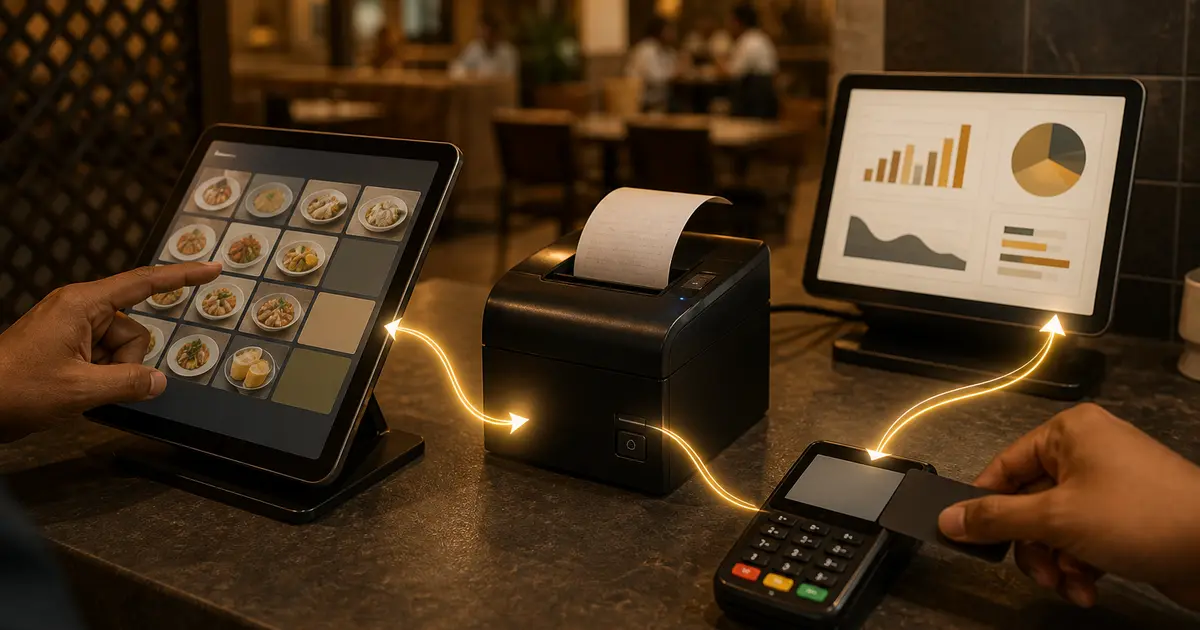
A useful POS machine definition separates the device from the system. The screen, software, receipt printer and payment service can be separate components. Buying one does not automatically include the others. Stripe's explanation of POS systems describes the combination of hardware and software used to support transactions.
POS terms in plain language
| Term | Meaning | Example |
|---|---|---|
| POS software | The application that records items, totals and sales | A restaurant billing app |
| POS terminal | The device used at the counter | A tablet or all-in-one touchscreen |
| Payment terminal | A device used with a provider to authorise payments | A bank-issued chip-and-PIN reader |
| Receipt printer | A printer for the customer's bill or receipt | A compatible thermal printer |
| POS system | The combined sales workflow and components | Software, screen, printer and payment records |
For a broader definition across business types, read what a POS system is. For purchasing decisions, see POS terminal versus payment terminal versus software.
POS versus a cash register
A basic cash register totals a sale and stores cash. A POS can also retain item-level records, organise a menu and produce reports. Features differ by software, so a touchscreen alone does not establish inventory, payroll or kitchen support.
Retail stores may need product barcodes and returns by SKU. Restaurants need menu items, portion sizes, modifiers, table references and preparation notes. A device suited to scanning packaged goods may run restaurant software, but its installed application still has to support the restaurant's workflow.
How a restaurant sale works
- The cashier selects a burger at BDT 350 and a coffee at BDT 200.
- The software totals BDT 550 in this example, with no extra charges or discount.
- The kitchen receives preparation details through the configured ticket or display workflow.
- The customer pays by an accepted method, and staff record the result.
- The receipt identifies the sale; the manager later checks the items and amount in reports.
A pay-first counter may take payment before sending preparation details. A table-service restaurant may send the order while the bill is still open. The example explains the components; confirm the supported sequence in your chosen software.
The receipts generated at checkout should be readable on the printer you will use. Check item names, quantities, totals and payment details. A kitchen order ticket serves preparation; it is not the same document as proof of customer payment. See how restaurant POS software connects orders, kitchen and billing.
Card readers and contactless payment
A card reader accepts a card or supported contactless payment through its payment provider. Payment processing includes authorisation and the provider's handling of the transaction. A “Card” button inside billing software can simply record that the customer paid on a separate terminal.
Ask whether the quoted setup includes a reader, a merchant agreement and a live connection to the software. If the terminal approves a payment, establish how staff connect that result to the correct bill. If it declines or times out, they need a clear procedure that avoids charging twice.
For Rosuii, card and Rocket are recorded payment methods, not built-in live gateways. Online bKash and Nagad checkout is a separate Pro-plan capability using the restaurant's own credentials. Subscription-payment methods for paying Rosuii do not establish which methods a restaurant can process at checkout.
What hardware do you need?
Start with the tasks staff must perform. A small counter may use a compatible existing computer or tablet with a thermal printer. A fixed, busy counter may benefit from a dedicated terminal. Neither is automatically the better choice for every restaurant.
- Screen: try common orders with real menu names and modifiers.
- Printer: verify paper width, connection, drivers and Bangla output.
- Payment reader: verify provider support and how the result reaches the bill.
- Kitchen: choose the display or printer workflow the team will actually use.
- Power and network: include realistic backup arrangements in the budget.
Compare complete quotes with the POS machine price guide. A low device price may exclude software, setup, paper, repairs or the payment service.
Cloud, offline and daily business operations
Cloud software stores or synchronises records through an online service. Offline support covers particular actions, not every function automatically. Ask for a demonstration using a previously loaded menu, a new order and reconnection.
Rosuii can queue eligible orders on a previously synced device and upload them when connectivity returns. Online-payment confirmation and live KDS or multi-device updates still need a connection. Test your printer path separately; a cached screen does not prove a network printer is reachable.
Many POS systems offer reporting and optional back-office modules. Check what is included in the plan, what needs configuration and what remains a manual process. Inventory records do not replace physical counts, and a sales summary does not establish bank settlement.
A practical demo checklist
Bring a short menu, one modifier, your printer model and your common payment methods. Enter an order, correct an item, print a receipt and find the transaction in a report. Ask the vendor to explain what happens if printing or payment confirmation fails.
Use the Rosuii POS feature page for product-specific capabilities and the current plan comparison for availability. Choose the components that support your actual service, then test the complete setup before relying on it during a rush.
Related guides
See this workflow in Rosuii: See what a restaurant POS system does
Sources checked
Last updated:
Frequently asked questions
What is the full form of POS?
Is a POS machine the same as a card reader?
Can a phone or tablet run POS software?
Does pressing Card process a credit card?
Is every POS function available offline?
Run your restaurant on Rosuii
POS, menu, inventory, payroll and more — built for Bangladeshi restaurants.
Start free