POS Machine Price in Bangladesh 2026: What Are You Buying?
Compare POS hardware listings from ৳17,500 to ৳70,000, checked 3 November 2026. See what each package includes, separate software charges and test printing before buying.
POS machine price in Bangladesh ranges from ৳17,500 to ৳70,000 across the in-stock BDStall listings checked 3 November 2026. The Z108 Android terminal with thermal printer is listed at ৳29,350. These are hardware listing prices; ask for software, installation and accessories to be itemised before comparing your total cost.
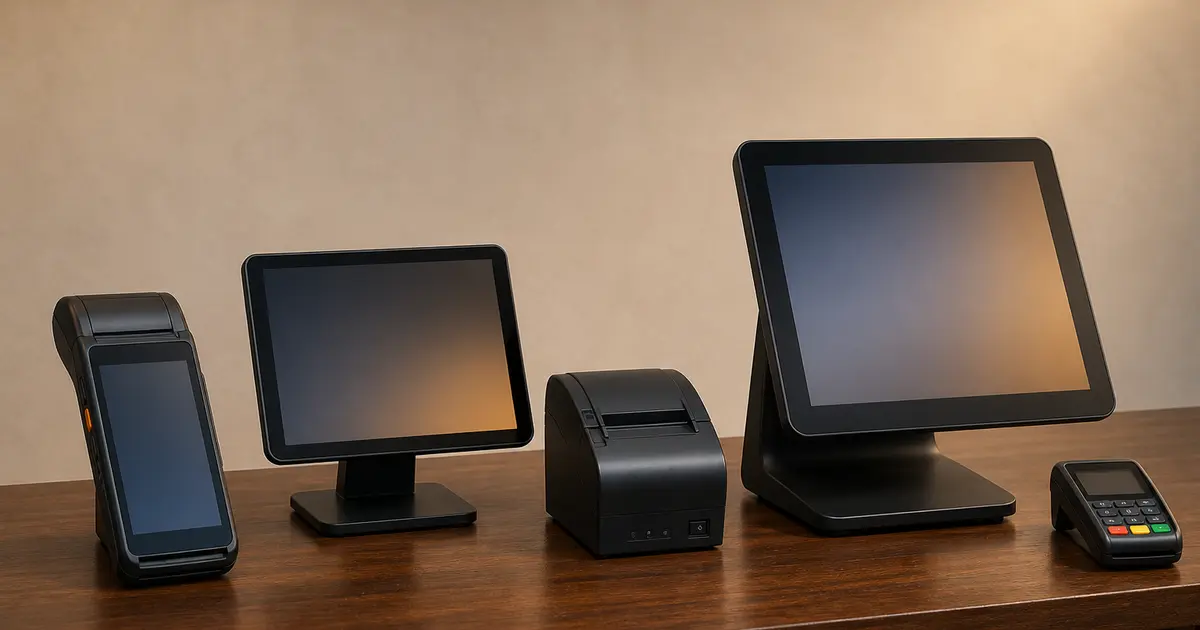
Ask a shop in Bangladesh for a “POS machine” and you could be shown three different things. One is an Android billing handset. Another is a touchscreen computer for the counter. The third is the bank's card machine. Some shops even list plain receipt printers under the same name. Work out which job you're buying for first: taking orders, printing kitchen tickets, or accepting cards.
Current retail POS machine prices
We pulled these from BDStall's POS machine page (bdstall.com/pos-machine) on 3 November 2026. It's one marketplace, and another shop may quote you more or less. Use the table to get a feel for the range, then ask the seller what's actually in stock and what comes in the box.
| Model | Listed price in BDT | Type | What to check |
|---|---|---|---|
| H10 POS Terminal Machine | ৳17,500 | POS terminal | Operating system, RAM, printer inclusion and warranty. The listing name alone does not establish compatibility. |
| Z108 Android Smart POS Terminal with Thermal Printer | ৳29,350 | Android terminal with thermal printer | Android version, app installation, paper width and printing from your chosen software. |
| I-Machine A1 Windows with POS Printer and 2nd Display | ৳70,000 | Windows counter system with printer and second display | CPU, RAM, display connections, printer drivers and the seller's service terms. |
| Sunmi V3 Android POS Terminal Printer | ৳28,000 (out of stock) | Android terminal with printer | Out of stock on 3 November 2026; ask the seller when it returns and which generation you would get. |
One warning. A built-in printer is only useful if your software can talk to it. Before you pay, ask the shop to print a real bill from your software on that exact unit.
Category: Android smart terminal
These are handheld touchscreens running Android, many with a thermal printer built in. They fit a food cart or a cramped counter well. If waiters will carry one between tables, run it through a full lunch service and see whether the battery lasts.
Ask for the Android version, RAM, storage and paper roll width, and find out who in Bangladesh updates the firmware. Need NFC or a scanner? Check it's there. Also ask how you install apps, because some units are locked to one vendor's software or are missing services your app depends on.
The Android POS machine price in Bangladesh guide focuses on that category. Use the Android terminal buying checklist when checking the seller's specification and printer demonstration.
Category: all-in-one counter
A counter POS combines a larger touchscreen computer with a stand and may include a customer display or printer. For a fixed cashier station, check screen readability, counter space and cable access before choosing the device.
Request the CPU, RAM, storage, operating system, display resolution and available ports in writing. Confirm which printer, drawer, scanner, software licence and installation services are included.
Rosuii's Windows POS supports local invoices, kitchen order tickets (KOTs) and labels with supported printing setups. Test printer setup, prepared-device offline sales and reconnection before putting the counter into service.
Category: bank card POS terminal
The card machine belongs to the bank's world: it reads the card and asks the bank to approve the payment. Your restaurant POS handles the menu, orders, kitchen tickets, stock and reports. Buying an Android billing handset won't let you take cards on its own.
Ask the bank for its application requirements, merchant discount rate (MDR), settlement terms, rental or deposit, network requirements and support arrangements. Card acceptance needs the bank's approval and suitable payment capability. Keep these costs separate from your restaurant software quote.
The lowest-cost POS setup
Your first POS machine might already be on your counter. Rosuii runs in a browser, or as a PWA, on a compatible phone, tablet or laptop, so you don't need a dedicated POS machine to use it. If you want paper receipts or kitchen tickets, add a supported printer.
For a small takeaway counter, try entering an order, sending it to the kitchen and completing the bill on your existing device. The guide to choosing a POS setup for your restaurant helps you decide when dedicated hardware is useful.
Rosuii provides restaurant software and does not sell POS machines. Its restaurant POS covers dine-in, takeaway and staff-entered delivery. Match the device to those order flows before committing to hardware.
Rosuii software prices are separate
Here's what Rosuii charges for the software, as checked on 31 October 2026:
| Plan | Monthly price in BDT | Yearly price in BDT | Limits |
|---|---|---|---|
| Free | ৳0 | ৳0 | 1 branch, 20 orders/day |
| Starter | ৳500 | ৳3,500 | 2 branches, 150 orders/day |
| Growth | ৳1,200 | ৳8,400 | 5 branches, 500 orders/day |
| Pro | ৳2,500 | ৳17,500 | Unlimited branches and orders |
There's no setup fee. Inventory, KDS and online ordering begin at Starter, so if you need those, Free won't cover you. When you work out your opening budget, put the device and printer quote next to the software cost on the same page. Stock tracking runs in the restaurant inventory software, which starts on Starter. If you want the whole operation in one place, not just billing, look at Rosuii as a restaurant management system.
Price is not the full budget
Ask the seller to mark each item as included, optional or separately charged:
- Printer, receipt paper and cash drawer
- Stand, scanner or customer display
- Software subscription and any licence bundled with the device
- A router, a backup mobile data pack and a UPS for load-shedding
- Someone to install it, set up printer drivers and train your staff
- Warranty terms, a spare adapter and what repairs cost
- The bank's MDR and settlement charges, if you take cards
If your counter prints kitchen tickets, cut the internet once during setup and see what happens. With Rosuii's offline POS, the Windows app keeps printing KOTs and receipts locally, and a browser counter queues eligible cash orders until the connection is back. The device has to be prepared while online first, and some connected features wait until you reconnect.
Before paying
- Write down the device category and the work it must handle.
- Get the exact model, specification, ports and included components on the quote.
- Test your actual POS software. For Rosuii, use a free Rosuii account to try the intended device.
- Print a Bangla receipt and an English receipt. Check any QR code you plan to print.
- Get the warranty, repair contact and return conditions in writing.
- Keep bank payment terms separate from hardware and software charges.
Define the machine before asking its price
A card-machine quote and a quote for a computer, printer and software bundle are answering different questions, so don't compare them side by side. If a seller's description is unclear, use the POS machine meaning guide to identify what is being offered.
Request separate lines for the device, software, payment service, printer, accessories and support. For software selection, use the restaurant software comparisons page after you have written down the order and kitchen workflows you need.
Compare quotes on the same basis
Compare quotes on the same tax, delivery and installation basis. Use the same period for recurring charges and check the evidence for each layer.
| Layer | Fields to compare | Evidence to request |
|---|---|---|
| Device | CPU, RAM, storage, screen and operating system | Exact model datasheet |
| Printer | Paper width, interface and cutter | Included model or separate quote |
| Payment | Provider, device and fees | Merchant agreement |
| Software | Plan, branch, order and device limits | Current plan details and quote |
| Setup | Installation, data import and training | Written scope |
| Warranty | Coverage period, parts and service | Seller's written terms |
| Recurring costs | Licence, data, support and consumables | Charges over the same period |
| Exit | Export, cancellation and replacement | Contract terms and an export test |
Hardware acceptance test
Test on your restaurant's network with your menu. Keep the printed receipts and record any failures while the seller's return conditions still apply.
- Match the delivered model and operating system to the quote.
- Enter and complete an order in the intended browser or app.
- Print a kitchen ticket and receipt; test the cutter and cash drawer if included.
- Check the USB, LAN or Bluetooth connection you will actually use.
- Turn off the Wi-Fi or mobile data, take an order, turn it back on, and check the queued order and the printout.
- If the device leaves the counter, see how long the battery lasts and how long it takes to charge.
- Look closely at a Bangla and an English printout. Watch for missing letters or lines cut off at the edge.
- Where payments are integrated, ask for a demonstration of successful and failed payment handling.
- Record the repair contact and how to request service.
Total ownership and buy decision
Add up everything over the same stretch, say two years: the machine, software, installation, paper rolls, internet, repairs and the time you spend training staff. Then ask what happens to that total if the handset dies in year one, and get the replacement price in writing.
Thinking of leasing instead? Add up every payment and compare it with the purchase price. Ask who owns the machine at the end, who fixes it, and what happens if you want out early. Before you sign, find out who is responsible for your data.
Write each quote down in one sheet: date, shop, exact model, VAT and delivery, software plan, payment provider, warranty and how the test went. Request itemised values for bundles, and rule out devices that fail your required order, printing, payment or export tests.
Buying for several counters? Get one unit first and live with it for a few days: opening, a busy dinner, a power or internet cut, and closing. Note every battery, printing or reconnection problem. Only then place the bigger order, and check that the delivered model matches the quote.
Features and plans are as listed on rosuii.com on 3 November 2026; check the pricing page for the current plan.
Last updated:
By Rosuii Team · Published by Rosuii, the software provider. · About the authors
Frequently asked questions
What is the POS machine price in Bangladesh?
Is a POS machine the same as a card machine?
Can I use a tablet instead of a dedicated POS machine?
Does the machine price include software?
Does Rosuii sell POS machines?
How much does Rosuii software cost?
Run your restaurant on Rosuii
POS, menu, inventory, payroll and more — built for Bangladeshi restaurants.
Start free